
Slingshot is best understood as a work management and collaboration platform that brings projects, conversations, dashboards, files, and business data into one shared workspace. For teams that struggle with scattered spreadsheets, separate chat threads, and disconnected reporting tools, its main value is consolidation: fewer places to check, clearer ownership, and better visibility into progress.
TLDR: Slingshot packages typically scale by team size, feature depth, data and analytics needs, and administrative controls. A 25-person operations team, for example, could use a mid-tier package to centralize tasks, dashboards, and discussions, potentially reducing weekly status meetings by 20% to 30% if reporting becomes self-service. Smaller teams should focus on task management and collaboration basics, while larger organizations should evaluate governance, integrations, permissions, and security. Pricing should always be verified directly with the provider because plan names, limits, and promotional rates can change.
What Slingshot Packages Are Designed to Solve
Most organizations do not adopt Slingshot simply because they need another task list. They consider it because work is spread across too many disconnected systems. Project updates may live in email, decisions in chat, files in cloud storage, and performance data in separate business intelligence tools. Slingshot packages are generally structured to address this problem at different levels of complexity.
At the entry level, the priority is usually simple collaboration: assigning work, tracking deadlines, and keeping discussion close to the project. At higher levels, the focus shifts toward data-driven execution, team-wide visibility, advanced permissions, analytics, and organizational management.

Core Features Commonly Found in Slingshot Packages
While exact inclusions may vary by plan, Slingshot is typically evaluated around several major feature categories. These are the areas buyers should compare carefully before choosing a package.
- Project and task management: Teams can create workspaces, assign tasks, set deadlines, monitor status, and coordinate work around shared goals.
- Team collaboration: Discussions, comments, mentions, and shared updates help reduce reliance on long email chains.
- Dashboards and analytics: Slingshot’s stronger packages often emphasize visual performance tracking, enabling teams to view metrics and progress in one place.
- File and content organization: Documents, links, and related materials can be grouped with projects or teams so context is easier to preserve.
- Data connectivity: More advanced options may support connecting business data sources to create dashboards and reports.
- Administrative controls: Larger teams typically need role-based permissions, workspace governance, and user management.
Package Levels: How to Think About Them
Slingshot packages can be understood in practical terms, even if the exact commercial labels change over time. A sensible evaluation is to group them into three broad buying scenarios: starter use, growing team use, and enterprise or advanced use.
1. Starter or Small Team Package
A starter-level package is best for small teams that need better coordination but do not yet require deep analytics or complex administration. This type of package is usually suitable for startups, small departments, agencies, or project groups that want a centralized place to plan work and communicate.
Typical priorities include:
- Creating tasks and assigning owners
- Tracking due dates and project progress
- Keeping comments and files attached to work items
- Improving visibility without heavy setup
The main advantage is simplicity. A smaller team does not want a tool that requires weeks of configuration. The risk, however, is outgrowing the package once reporting, data integrations, or stricter permissions become necessary.
2. Business or Team Growth Package
This is often the most relevant option for teams that have moved beyond basic task tracking. A business-level package usually supports more users, more structured workspaces, better reporting, and stronger collaboration across departments. It is appropriate for marketing teams, product groups, operations teams, and client-facing service organizations.
For example, a 40-person company managing five active initiatives may need shared dashboards showing campaign status, sales pipeline activity, customer support trends, and operational tasks. In that case, the value is not only assigning work but also linking work to measurable outcomes.

3. Enterprise or Advanced Package
An enterprise-level package is designed for organizations that require scale, governance, and security. These buyers usually care about user roles, access controls, auditability, data source management, integration support, and onboarding assistance. The decision is less about whether Slingshot can manage tasks and more about whether it can operate reliably across departments with different responsibilities.
Enterprise buyers should ask about:
- Security standards: How data is protected, stored, and accessed
- Permission models: Whether sensitive projects and dashboards can be limited to specific users
- Integration options: Whether existing systems can connect cleanly
- Support and onboarding: Whether implementation help is included or optional
- Scalability: Whether performance and governance remain strong as user count grows
Pricing: What Buyers Should Expect
Slingshot pricing should be reviewed directly through the official sales or pricing channel because subscription structures may change. Like many collaboration platforms, pricing is commonly influenced by number of users, feature tier, billing frequency, data and analytics requirements, and support level.
In many software evaluations, annual billing can reduce the effective monthly cost compared with month-to-month payment. However, the lowest price is not always the best value. A package that saves a team five hours per week in reporting and coordination can justify a higher subscription cost if those hours are redirected to revenue-generating or operationally important work.
When comparing packages, calculate the cost in three layers:
- Subscription cost: The direct monthly or annual fee.
- Implementation cost: Time spent configuring workspaces, importing data, and training users.
- Adoption cost: The effort required to change team habits and standardize workflows.
Collaboration Capabilities That Matter Most
The collaboration value of Slingshot depends on whether teams actually use it as their central work hub. The strongest results come when organizations define clear rules: where tasks are created, where decisions are recorded, where files are stored, and how status updates are handled.
Useful collaboration capabilities include shared workspaces, task comments, notifications, dashboard visibility, and contextual communication. Instead of asking, “Where is the latest update?” a manager can open the relevant workspace and review progress, blockers, and supporting data together.
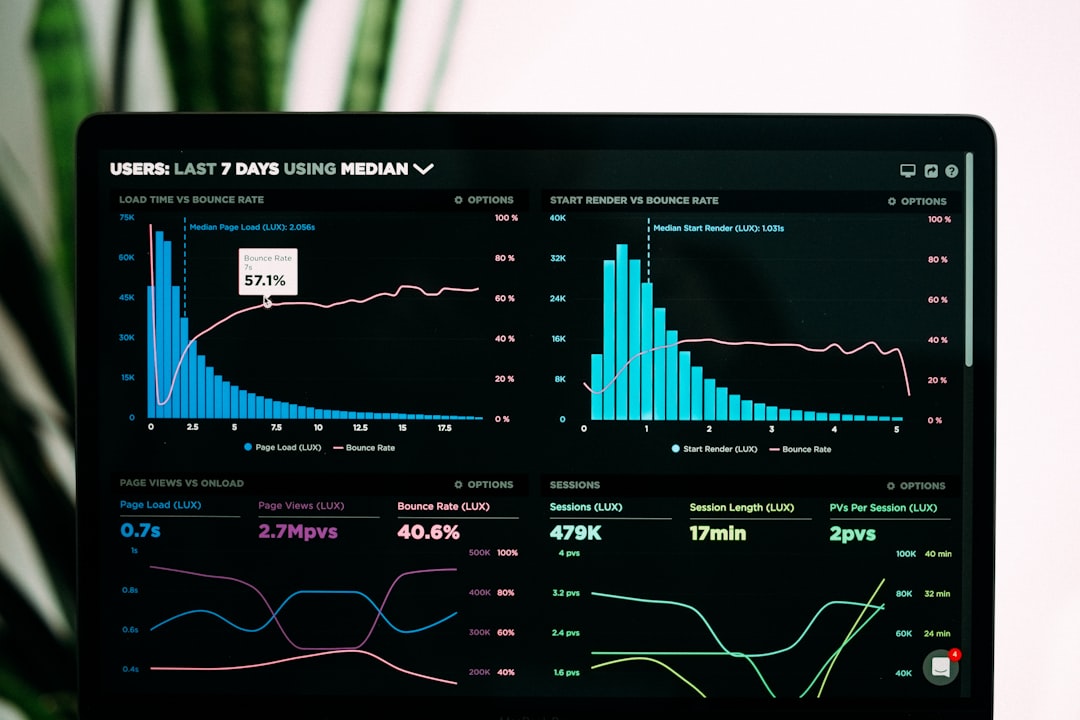
This is especially important for hybrid and remote teams. When people are not in the same office, a structured workspace reduces ambiguity. A well-configured Slingshot environment can help clarify who owns each task, what has changed since the last review, and which decisions still need attention.
How to Choose the Right Package
The best package is not necessarily the most advanced one. It is the package that matches the organization’s current workflow maturity and near-term growth. A small team may waste money on enterprise controls it does not need, while a larger company may create risk by choosing a plan without sufficient permissions or reporting depth.
Before selecting a package, answer these questions:
- How many active users need access now, and how many may need access within 12 months?
- Do teams only need task management, or do they also need dashboards and analytics?
- Will sensitive data require controlled access by department or role?
- Which existing tools must remain connected to the workflow?
- Who will own setup, standards, training, and ongoing governance?
Final Assessment
Slingshot packages are most compelling for teams that want to combine execution and visibility in one environment. Its value increases when collaboration is tied to measurable data rather than isolated task lists. Small teams should prioritize ease of use and adoption, mid-sized teams should focus on dashboards and cross-functional coordination, and larger organizations should examine security, integrations, permissions, and support.
The most responsible buying approach is to map required features before reviewing price. If a package improves accountability, reduces reporting friction, and gives leaders reliable visibility into work, it can become more than a collaboration tool. It can become a practical operating layer for the organization.
Leave a Reply