
Choosing practice management software is rarely just a software decision. For clinics, wellness centers, and integrative healthcare providers, the right platform affects scheduling, documentation, billing, patient communication, and even how quickly staff can move through a busy day. Optimantra is one of the platforms built specifically for healthcare practices that want an all-in-one system rather than a patchwork of separate tools.
TLDR: Optimantra is a cloud-based practice management and EHR platform designed especially for integrative, functional, and wellness-focused clinics. A small clinic with 3 providers, for example, could use it to centralize online booking, charting, billing, and patient forms, potentially reducing administrative time by 20–30% if it currently uses separate tools. Its strongest advantages are its healthcare-focused workflows and broad feature set, while its main drawbacks are pricing transparency and a learning curve for new users. It competes most directly with platforms like Jane, Practice Better, SimplePractice, and ChiroTouch.
What Is Optimantra?
Optimantra is a cloud-based electronic health record and practice management system aimed at clinics that want to manage patient care, appointments, payments, documentation, and communication from one place. While many general EHR systems focus heavily on conventional medical practices, Optimantra is often associated with integrative medicine, naturopathy, acupuncture, chiropractic, functional medicine, wellness clinics, and multidisciplinary practices.
The platform is designed to support both the clinical and administrative sides of a practice. That means a practitioner can review patient history, write chart notes, create treatment plans, and send follow-ups, while front-desk staff can schedule appointments, process payments, and manage reminders.
Key Features of Optimantra
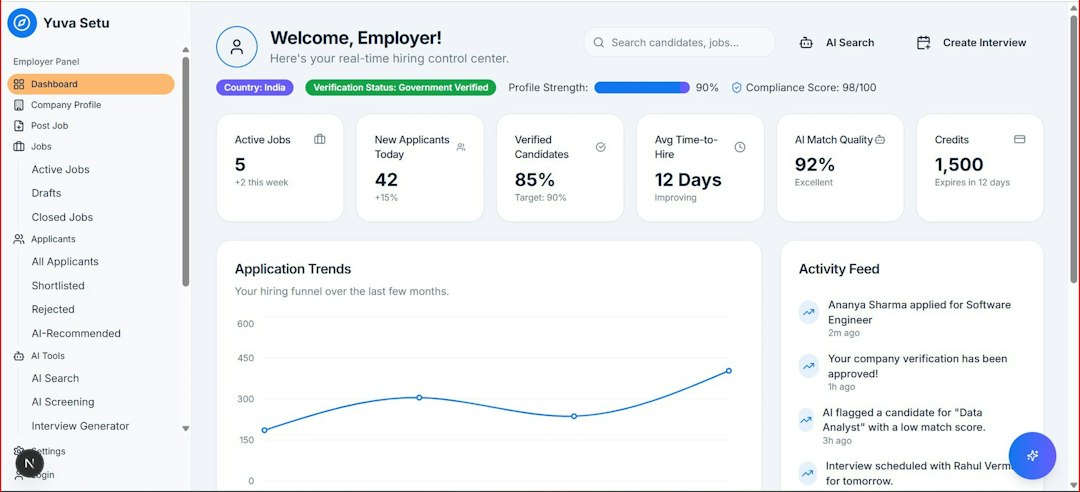
Optimantra’s biggest appeal is that it combines multiple tools into a single clinic management environment. Instead of using separate apps for scheduling, forms, payments, and documentation, clinics can keep everything connected.
- Online scheduling: Patients can book appointments online, while staff can manage provider calendars, appointment types, and availability.
- Electronic health records: Providers can document visits, maintain patient histories, track diagnoses, and store clinical notes securely.
- Custom forms: Clinics can create intake forms, consent forms, questionnaires, and follow-up forms that patients complete before visits.
- Patient portal: Patients can access forms, appointment details, secure messages, and possibly clinical documents depending on configuration.
- Billing and payments: The platform supports invoices, payment tracking, and billing workflows, helping reduce manual administrative work.
- Telehealth support: Many modern clinics need virtual care options, and Optimantra includes tools intended to support remote consultations.
- Reminders and communication: Automated email or SMS reminders can help reduce no-shows and improve patient engagement.
- Inventory and supplement sales: For wellness and functional medicine practices, support for product or supplement management can be useful.
- Reporting: Clinics can review operational and financial data, such as appointment volume, revenue, billing status, and provider activity.
Pricing: How Much Does Optimantra Cost?
Optimantra pricing is not always presented as a simple public price list, so the best approach is to request a current quote or demo directly from the company. Like many healthcare software platforms, pricing may depend on factors such as the number of providers, locations, users, modules, implementation needs, and whether features like telehealth, billing, or integrations are included.
For budgeting purposes, small clinics should generally think in terms of a monthly subscription cost, often scaling with practice size. A solo provider may pay significantly less than a multi-provider clinic with front-desk staff, multiple calendars, billing workflows, and custom forms. There may also be additional costs for onboarding, training, data migration, payment processing, or optional services.
Practical tip: Before signing up, ask for an itemized quote that separates provider licenses, administrative users, setup fees, data migration, support, and payment processing charges. This makes it easier to compare Optimantra with competitors fairly.
What Optimantra Does Well
One of Optimantra’s strongest qualities is its focus on practices that do not always fit neatly into traditional EHR templates. Integrative and wellness providers often need longer intake forms, lifestyle questionnaires, supplement recommendations, and more flexible documentation. Optimantra’s customizable approach can be a major advantage here.
Another strength is workflow consolidation. If a practice is currently using Google Calendar for scheduling, PDFs for intake forms, spreadsheets for payments, and email for reminders, moving to one connected platform can reduce errors and save time. For example, when a patient books online, fills out an intake form, and appears in the provider’s charting workflow automatically, fewer manual steps are required.
Pros of Optimantra
- All-in-one functionality: Scheduling, records, billing, reminders, forms, and patient management are available in one system.
- Good fit for integrative care: The platform is suitable for clinics that need more flexible documentation and wellness-oriented workflows.
- Customizable forms and notes: Practices can tailor intake forms and clinical templates to match their services.
- Cloud-based access: Staff and providers can access the system from different locations, which is useful for remote or hybrid practices.
- Patient engagement tools: Online forms, portals, and reminders can improve communication and reduce missed appointments.
Cons of Optimantra
- Pricing may not be immediately transparent: Clinics may need to contact sales to understand the true monthly cost.
- Learning curve: Because the platform includes many features, new users may need training before they feel comfortable.
- Interface preferences vary: Some teams may find the system less modern or less intuitive than newer lightweight competitors.
- May be more than a solo practitioner needs: If you only need basic scheduling and simple notes, a smaller tool may be cheaper and easier.
- Implementation planning is important: Migrating forms, patient data, billing workflows, and templates can take time.
Who Should Use Optimantra?
Optimantra is best suited for small to mid-sized healthcare and wellness practices that need more than basic appointment booking. It is especially relevant for clinics offering functional medicine, naturopathy, acupuncture, chiropractic care, nutrition counseling, or multidisciplinary wellness services.
It may be a strong choice if your clinic needs customized intake forms, detailed patient histories, secure patient communication, billing tools, and centralized scheduling. However, if you run a very small practice and only need simple booking and note-taking, you may find a lighter platform more cost-effective.
Top Optimantra Competitors
Optimantra sits in a competitive market, and the best alternative depends on your clinic type, budget, and workflow needs.
- Jane: Popular among allied health, chiropractic, massage, and wellness clinics. It is known for a clean interface, online booking, charting, and payment tools.
- Practice Better: A strong option for nutritionists, health coaches, and wellness professionals who need programs, client packages, forms, and messaging.
- SimplePractice: Often used by therapists, counselors, and wellness providers. It offers scheduling, documentation, telehealth, billing, and client communication.
- ChiroTouch: Built specifically for chiropractic practices, with strong chiropractic documentation, billing, and workflow tools.
- Kareo or Tebra: Better suited for medical practices that need more conventional EHR, billing, insurance, and patient management features.

Final Verdict
Optimantra is a capable, healthcare-focused platform for clinics that want scheduling, EHR, forms, billing, communication, and patient management in one place. Its greatest value comes from supporting more complex workflows, especially for integrative and wellness-oriented practices that need customizable documentation and patient engagement tools.
The main caution is that prospective buyers should evaluate pricing carefully and request a detailed demo. Because the platform can be feature-rich, it is important to confirm that your team will actually use the tools you are paying for. For the right clinic, Optimantra can become a central operating system; for a very small or simple practice, it may feel more powerful than necessary.
Bottom line: If your practice is growing, managing multiple providers, or struggling with disconnected admin tools, Optimantra is worth shortlisting. Compare it against Jane, Practice Better, SimplePractice, and specialty-specific platforms before making a final decision.
Leave a Reply